Characteristics are the atoms of variant configuration. Every dependency, every BOM selection, every pricing condition references a characteristic and its values. Get the design right and everything downstream is straightforward. Get it wrong and you chase configuration errors for months.
These are the patterns I apply on every project. They come from experience: fixing models where someone created 500 characteristics without thinking about data types, then wondered why CU50 ran slowly.
Sources: Transaction CT04 | SAP Note 3366124 — AVC Improvements
Data Type Selection
SAP offers six data types for characteristics: CHAR (character), NUM (numeric), DATE, TIME, CURR (currency), and QUAN (quantity). For VC, you will use CHAR and NUM 95% of the time.
CHAR for: product type, color, material, configuration mode (anything that is a category label). CHAR values are single values or single values with dependencies.
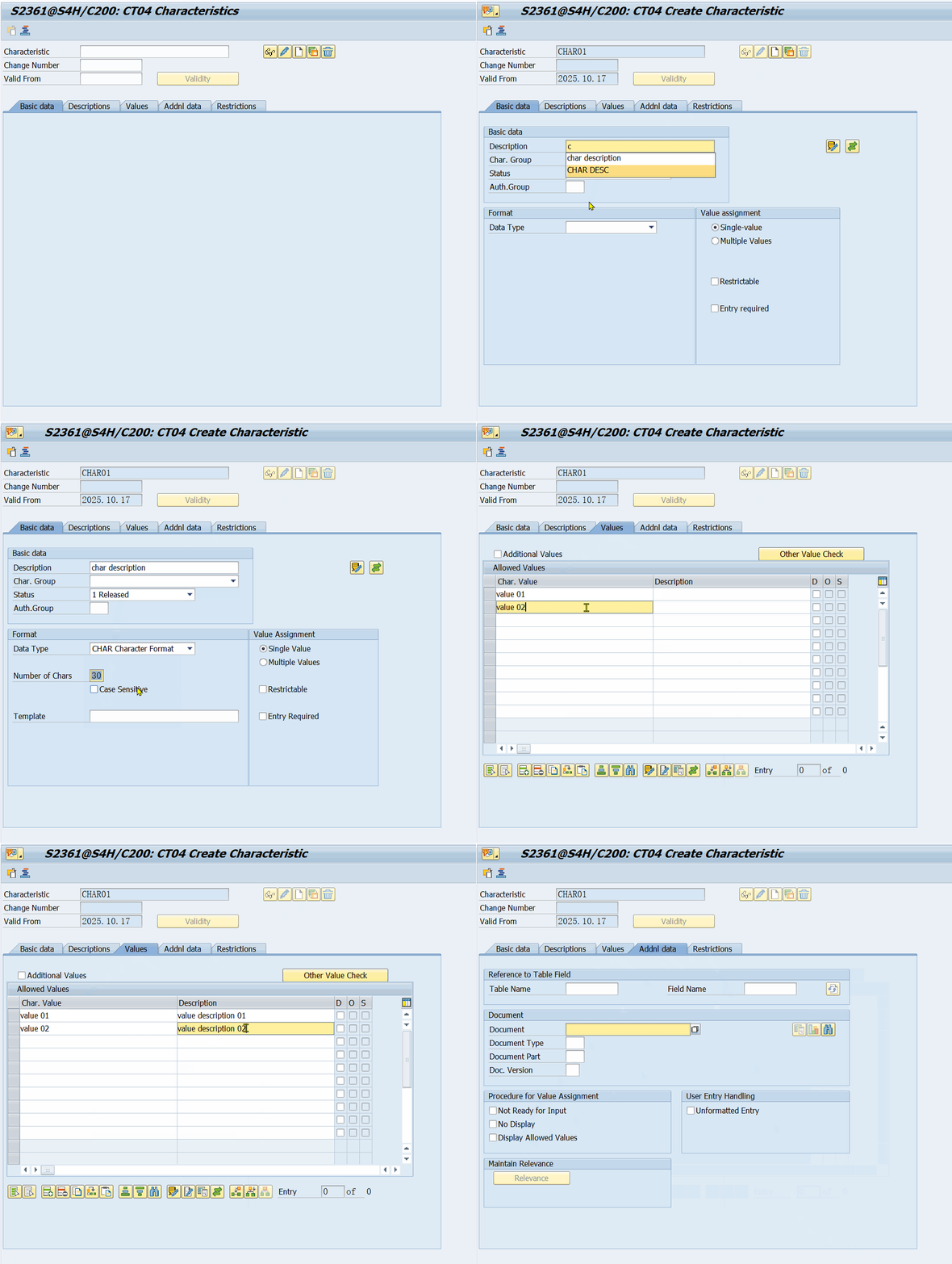 SAP transaction CT04: creating a CHAR-type characteristic with allowed values
NUM for: dimensions, weight, speed, power, temperature (anything that needs arithmetic). NUM values allow ranges, intervals, and mathematical operations in dependencies.
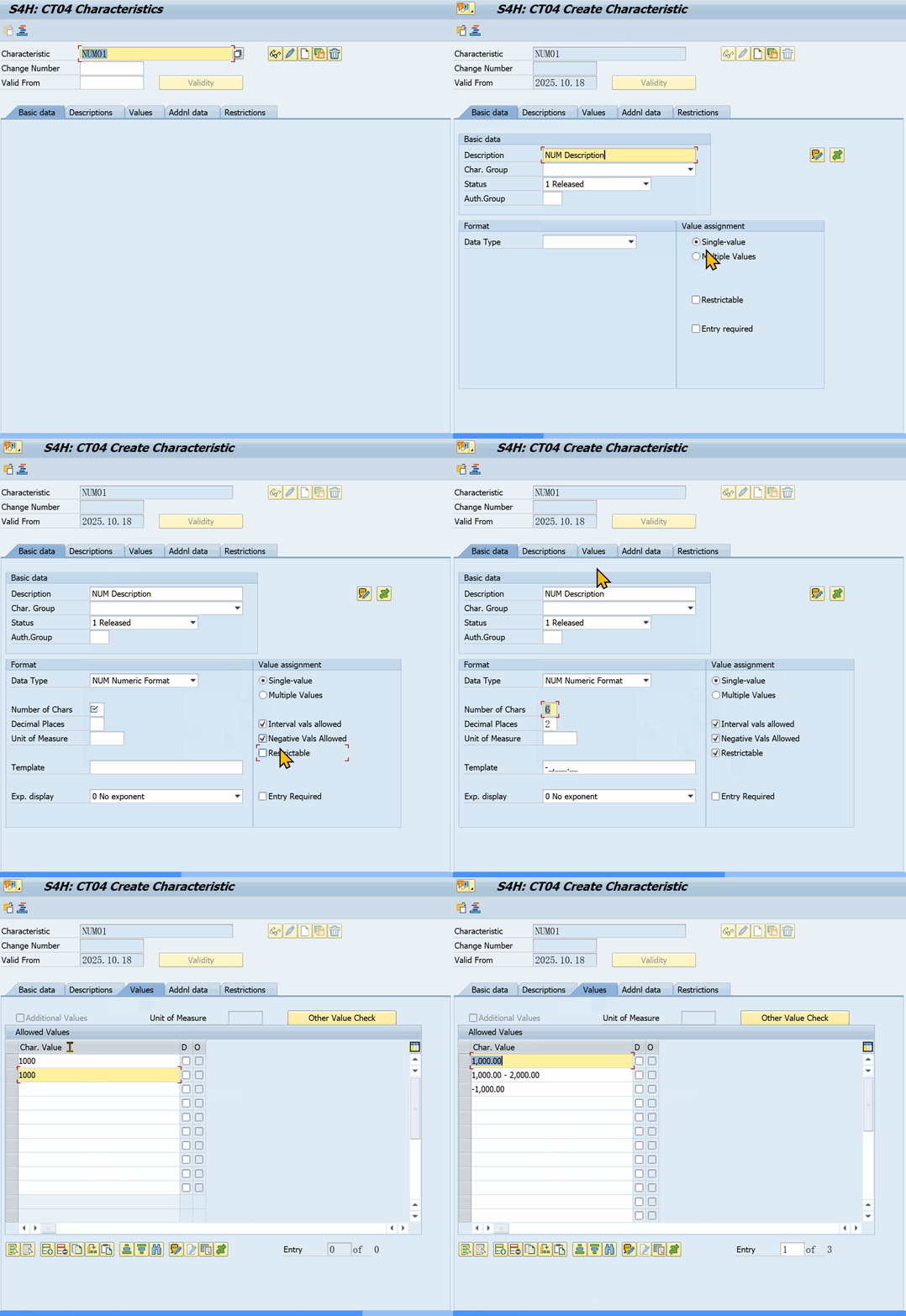 SAP transaction CT04: creating a NUM-type characteristic with interval values
Video walkthrough: creating a CHAR characteristic in CT04 (full process)
Rules:
- Use NUM when you need calculations. If you assign NUM to a dimension, you can write
$self.LENGTH > 2.5in a procedure. With CHAR, you would need single values for each length range and a precondition to update them when the range changes. - Use CHAR for categories even if the values look numeric. "Size 10" as a size code should be CHAR with the value '10', not NUM. NUM implies numeric comparison.
- Use QUAN with a unit for physical measurements where the unit matters: length in mm vs cm, weight in kg vs g. The system handles unit conversion automatically.
Gotcha: Switching a data type after characteristics are created requires deleting and recreating values. Get this right at the start.
Source: Transaction CT04 — characteristic format field (CHAR, NUM, DATE, etc.)
Value Assignment Strategy
Two approaches: single-value and multiple-value.
Single-value characteristics are the default. The user picks one value from the allowed set. This is correct for most VC scenarios: a product has one color, one power rating, one material.
Multiple-value characteristics allow selecting several values. Used for things like "optional equipment" or "available features."
Rules:
- Keep multiple-value characteristics to a minimum. They complicate dependency logic and degrade performance. A constraint checking a multiple-value characteristic has to check value by value.
- When you need multiple-value, consider splitting into individual boolean characteristics. Example: instead of a multiple-value "OPTIONAL_FEATURES" with values 'HeatedSeats', 'Sunroof', 'GPS', create separate characteristics: HAS_HEATED_SEATS, HAS_SUNROOF, HAS_GPS. Each is CHAR with values 'X' and ''.
- Individual booleans are easier to reference in dependencies.
$self.HAS_HEATED_SEATS = 'X'is simpler than$self.OPTIONAL_FEATURES in ('HeatedSeats').
Gotcha: Default values on characteristics are set in CT04 at the characteristic level. These apply when no procedure sets a value. If you define a default in the characteristic AND a default in a procedure ($SET_DEFAULT), the procedure default takes priority because procedures run at configuration time, not at characteristic creation.
Restrictable Flag
In LO-VC, every characteristic used in a constraint must have the restrictable flag checked. This flag tells the constraint solver that it can restrict this characteristic's value domain.
If you forget this flag, your constraint will not restrict values. The constraint engine sees the characteristic as read-only and will not propose value changes during domain narrowing.
In AVC, all characteristics are restrictable by default. This is one of the AVC improvements that eliminate a common setup error.
When to set it: Always. Unless you are sure a characteristic will never appear in a constraint, set restrictable. The performance impact of setting it on characteristics that never appear in constraints is negligible. The cost of missing it is a configuration bug that takes hours to find.
Source: SAP Note 3366124 - AVC Improvements
Value Ranges and Intervals
For NUM characteristics, you can define value ranges instead of single values. This is useful for dimensions, weights, and other measurements.
Example: LENGTH can have allowed values 0.5 to 5.0 meters, in 0.1 increments. The user enters any value in the range, and the system validates against the range definition.
Rules:
- Keep value ranges tight. A range of 0 to 10000 meters means the user can enter unrealistic values. Define the realistic range based on the product portfolio.
- Use intervals for continuous values. Use single values for discrete options.
- Value ranges on NUM characteristics can be used in procedures with comparison operators.
$self.LENGTH > 2.0works naturally.
Characteristic Naming Conventions
This is not optional. On a project with 200+ characteristics, a naming convention is what makes the difference between a maintainable model and a disaster.
The convention I use:
- Prefixes for the domain or module: DOOR_ for door characteristics, ELEV_ for elevator characteristics, CABLE_ for cable characteristics.
- Suffixes for data type indication: _NUM for numeric, _QTY for quantity, _CODE for CHAR codes.
- No abbreviations that need a lookup table. DOOR_HEIGHT not DH. PANEL_MODEL not PM.
Example:
| Characteristic | Data Type | Purpose |
|---|---|---|
| DOOR_TYPE | CHAR | Type of door panel |
| DOOR_COLOR | CHAR | Color code |
| DOOR_HEIGHT_NUM | NUM | Panel height in mm |
| DOOR_WIDTH_NUM | NUM | Panel width in mm |
| CABLE_LENGTH_QTY | QUAN | Cable length with unit |
Gotcha: SAP limits characteristic names to 30 characters (in ECC/CT04) or 40 characters (in S/4HANA). If you use long prefixes and suffixes, you hit this limit fast. Be concise but unambiguous.
Performance Implications
Characteristic design directly impacts configuration engine performance.
What slows down CU50/CU41:
- Too many characteristics in a class. Above 100 characteristics per class, the configuration engine starts to degrade.
- Multiple-value characteristics with many values. Each value check adds processing overhead.
- Characteristics used in constraints without the restrictable flag. The constraint solver wastes cycles checking them.
- Characteristics with long value lists. Each value in a precondition evaluation is a check. Keep value lists under 50 per characteristic.
- CHAR characteristics with values that could be NUM characteristics. Procedures do arithmetic instantly but string matching is slower.
What speeds things up:
- Keep characteristics under 80 per class. Split large models into sub-classes.
- Use NUM for anything that needs comparison.
$self.SPEED > 1.5evaluates faster on NUM than string matching on CHAR. - Use variant tables for large decision matrices. A table lookup is faster than 50 nested IF statements in a procedure.
- Set restrictable on all characteristics that might appear in constraints.
- Minimize dependency counts on individual characteristics. A characteristic with 10 procedures attached to it is more expensive than one with 2 procedures.
Source: Transaction CU41 (or PMEVC in S/4HANA) — configuration profile processing sequence tab
Characteristic vs Configuration Profile
A common design choice: should a dependency be on the characteristic or the configuration profile?
On the characteristic: Best for dependencies that are specific to that characteristic. Preconditions assigned to characteristic values. Procedures that infer that specific characteristic's value. Selection conditions assigned to the characteristic on the profile.
On the configuration profile: Best for dependencies that span multiple characteristics or objects. Constraint nets. Procedures that set multiple characteristics. Default values that should apply to the entire configuration.
Gotcha: Dependencies on the characteristic are evaluated every time that characteristic appears in a configuration. If the same characteristic is used in 5 different materials, the dependency runs for each one. Dependencies on the profile run only for that specific profile. Use profile-level dependencies when the logic is material-specific.
Summary Checklist
Before going live with a VC model, check these:
- Data types are correct from the start (CHAR for categories, NUM for calculations)
- Multiple-value characteristics are split into individual booleans where practical
- Restrictable flag is set on all characteristics used in constraints
- Value ranges on NUM characteristics reflect the real product portfolio
- Naming convention is documented and applied consistently
- Characteristics per class is under 100 (aim for 80)
- Dependency counts per characteristic are reasonable
- Profile-level dependencies vs characteristic-level dependencies are correctly assigned
- Tested with a realistic BOM and routing to confirm performance
Comments & Danmaku
Leave a comment — it flies across the page as danmaku!