Object dependencies are the logic engine of Variant Configuration. They control what values are allowed, which BOM components get selected, how pricing surcharges are calculated, and which operations go into the routing.
This reference covers every dependency type, its syntax, where it gets assigned, how the system processes them, and what each table stores.
Sources: Transactions CU01–CU04 (dependency maintenance) | CU21/CU22/CU23 (constraint nets) | CU41 (configuration profile)
The Dependency Types
SAP supports four dependency types. Preconditions, Selection Conditions, and Procedures all use the same generic transactions:
| Type | Create | Change | Display | Purpose |
|---|---|---|---|---|
| Precondition | CU01 | CU02 | CU03 | Hide disallowed characteristic values |
| Selection Condition | CU01 | CU02 | CU03 | Select BOM items, operations, PRTs |
| Procedure | CU01 | CU02 | CU03 | Infer values, change master data fields |
| Constraint | CU21 (create) | CU22 (change) | CU23 (display) | Describe relationships between objects |
Additional analysis transactions:
| Transaction | Purpose |
|---|---|
| CU04 | Report — list dependencies for a material or class |
| CU06 | Where-used list — find which objects reference a dependency |
Preconditions
Assigned to: Characteristic values (mainly) and characteristics Purpose: Hide disallowed values. If the precondition is not met, the value is invisible on the configuration screen.
A precondition attached to a characteristic value means: "this value is only available when the condition is true."
Example: A bike has characteristic MODEL with values Racing, Standard, Mountain. Characteristic GEARS has values 10, 12, 17, 21. Value 21 is only available when MODEL = Racing.
Model eq 'Racing' and specified MODEL
This precondition is attached to value 21 of characteristic GEARS. The user can only select 21 gears if MODEL is already set to Racing.
Key rules:
- Preconditions on characteristics hide the entire characteristic
- Preconditions on characteristic values hide individual values
- Use constraints instead of preconditions when possible (easier to locate and debug)
- The syntax is a boolean expression that evaluates to true or false
Selection Conditions
Assigned to: BOM items and routing operations Purpose: Determine which components and operations are needed for a specific configuration.
A selection condition controls whether a BOM item (component) or routing operation is included in the production order. If the condition evaluates to false, the component or operation is excluded.
Syntax (BOM):
$parent.<CHARACTERISTIC> = '<VALUE>' AND $parent.<OTHER_CHAR> <OP> <VALUE>
Example: Select a specific handlebar component only when the bike model is Racing.
$parent.MODEL = 'Racing'
Example with multiple conditions:
$parent.MODEL = 'Racing' and $parent.COLOR = 'Red'
Key differences from preconditions:
- Selection conditions control BOM/routing inclusion, not UI visibility
- They use
$parent.to reference characteristics of the configurable material - They also serve as required conditions: if a characteristic has a selection condition, it becomes mandatory to fill
Procedures
Assigned to: Characteristics, characteristic values, or configuration profile Purpose: The workhorse of VC logic. Infer values, set defaults, calculate formulas, update master data fields.
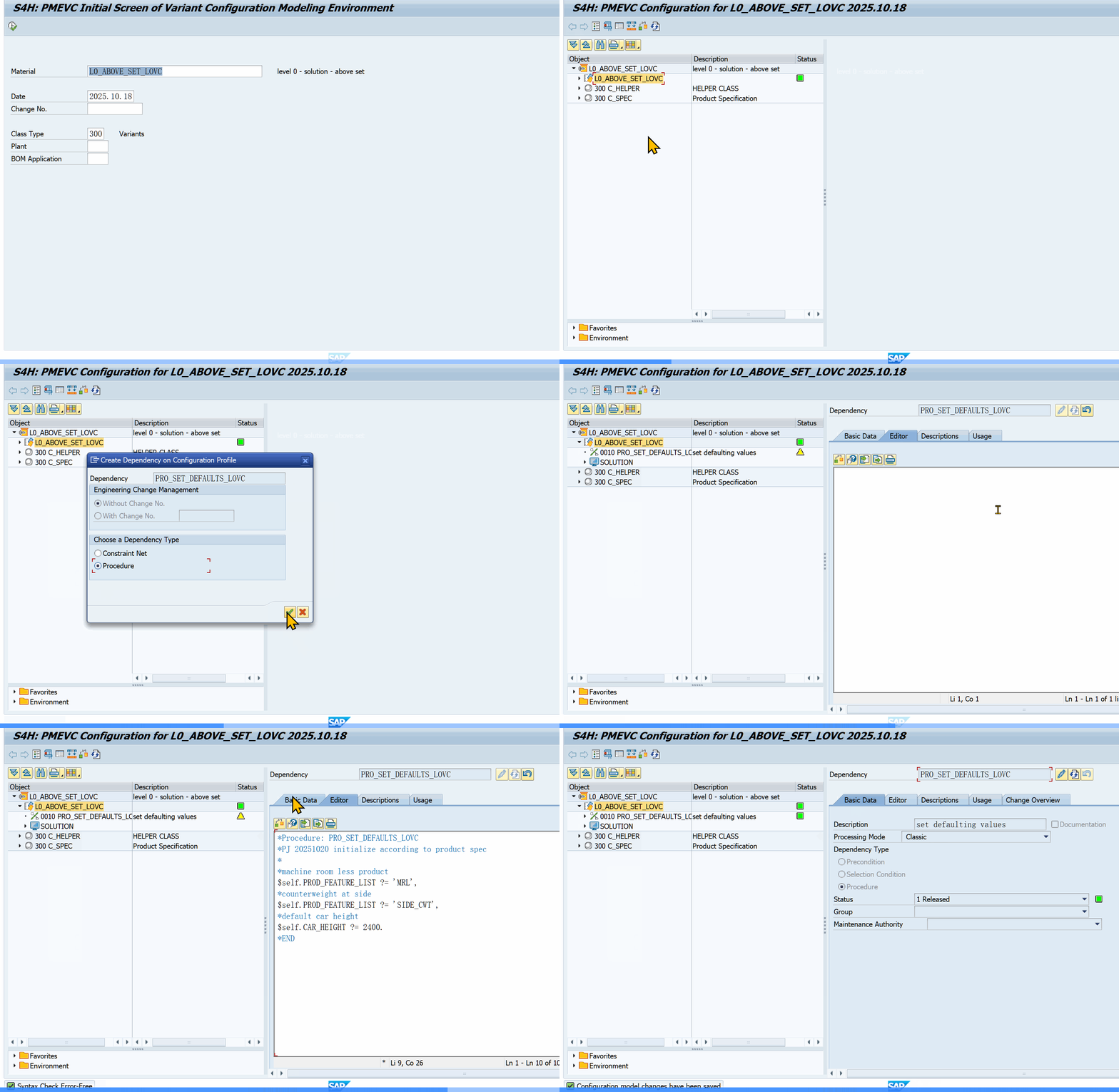 PMEVC Fiori: defining procedure, precondition, and selection condition dependencies
Procedures execute every time the user changes a characteristic value. They can set defaults (user-overridable) or force values (user-cannot-override).
Core syntax patterns:
| Pattern | Syntax | Use Case |
|---|---|---|
| Force value | $self.COLOR = 'Red' |
Set a value the user cannot change |
| Default value | $self.COLOR ?= 'Blue' |
Set a default the user can override |
| Conditional | $self.COLOR = 'Red' if $self.TYPE = 'Standard' |
Set value based on another char |
| Multi-condition | $self.COLOR = 'Red' if $self.TYPE = 'Standard' and $self.SIZE > 10 |
Complex conditions |
| Default on unset | $self.COLOR ?= 'Blue' if not ($self.COLOR specified) |
Set default only if not already entered |
| Text concat | $self.DESCRIPTION = $self.TYPE || '-' || $self.COLOR |
Build descriptions |
| Arithmetic | $self.AREA = $self.WIDTH * $self.LENGTH |
Calculate values |
Setting variant pricing surcharges:
$self.surcharge2 = 'HD-003_02' if $self.HD_COLOR = 'Black'
This works with a reference characteristic pointing to SDCOM-VKOND and condition type VA00.
Pricing factor syntax:
$SET_PRICING_FACTOR ($SELF, <reference characteristic>, <variant key>, <factor>)
Summing values from child BOM items:
$SUM_PARTS ($SELF, <characteristic>)
Used to calculate total weight of components and write to VCSD_UPDATE-BRGEW (gross weight).
Counting BOM items:
$COUNT_PARTS ($SELF)
Deleting defaults:
$DEL_DEFAULT ($SELF, <characteristic>, <term>)
Procedures vs Constraints
Use procedures for value inference and defaults. Use constraints for cross-object relationship enforcement. They serve different purposes and complement each other.
Constraints
Assigned to: Configuration profile (via dependency nets) Purpose: Describe relationships between different objects in a configuration.
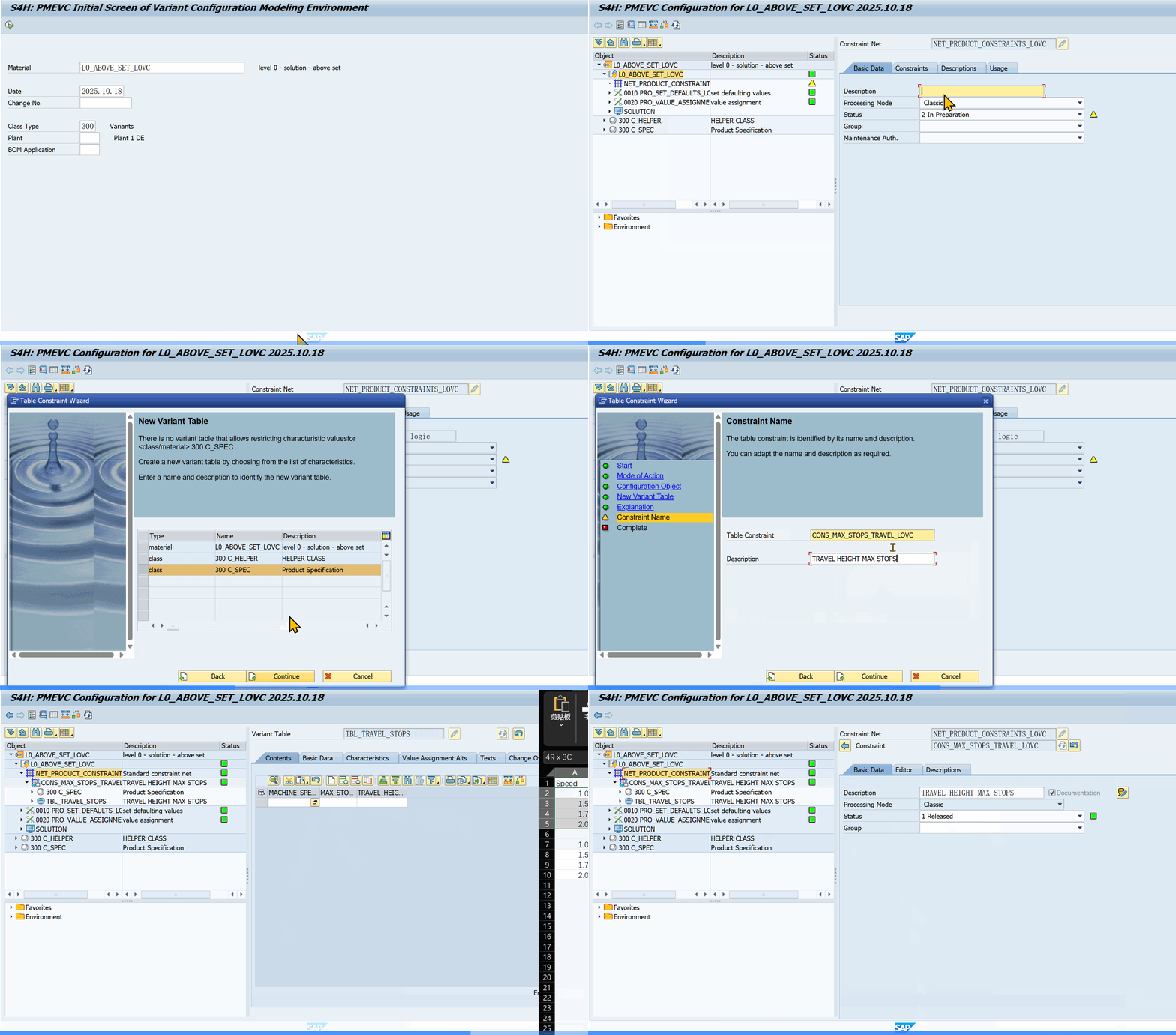 PMEVC: defining a constraint with value restriction rules in the dependency net Handle complex cross-object logic.
Constraints are grouped together in dependency nets. The net is assigned to the configuration profile.
A constraint has four sections:
| Section | Purpose |
|---|---|
| OBJECTS | Declare all classes and objects involved |
| CONDITION | Prerequisite for processing the constraint |
| RESTRICTIONS | Check and set value relationships |
| INFERENCES | Define which values to infer automatically |
Example: A hard disk can only be 16GB for a tower casing or 8GB for a mini tower.
OBJECTS:
  CASE IS-A CLASS 'CASE_CLASS',
  HD IS-A CLASS 'HD_CLASS'

CONDITION:
  CASE.MODEL = 'Tower' OR CASE.MODEL = 'Mini'

RESTRICTIONS:
  HD.SIZE = '16GB' IF CASE.MODEL = 'Tower',
  HD.SIZE = '8GB' IF CASE.MODEL = 'Mini'

INFERENCES:
  HD.SIZE
Key difference from procedures:
- Constraints use general object references (no
$SELF/$PARENT/$ROOT) - Constraints only execute when all objects in the OBJECTS section exist in the configuration
- Constraints have more overhead but execute only when required
- Constraints enforce consistency across different BOM levels
Dependency nets (constraint nets) are created via CU21, changed via CU22, displayed via CU23. The net groups related constraints — individual constraints are created inside the net. The net is then assigned to the configuration profile (CU41 / PMEVC — assignment tab).
Constraints vs Procedures: Key Differences
| Aspect | Procedure | Constraint |
|---|---|---|
| Object reference | $SELF, $PARENT, $ROOT | Declared objects by class |
| Scope | Single object | Multiple objects/classes |
| Trigger | Every config change | When all declared objects exist |
| Syntax | Value assignments | Declarative restrictions |
| Pricing | ✅ Supported | ❌ Not in LO-VC (AVC supports) |
When to use constraints over preconditions: Preconditions are attached to individual characteristic values — finding all of them means checking every value. Constraints live in the config profile dependency net. Use constraints when two different classes interact, you need cross-level consistency, or the logic involves multiple objects with the same pattern. Use preconditions for simple single-value hiding.
Advanced Constraint Patterns
Pattern 1: Value inheritance for non-restrictable characteristics. Some characteristics have the "Restrictable" flag unchecked, preventing inheritance. A constraint can force it:
OBJECTS:
  PARENT IS-A CLASS 'PARENT_CLASS',
  CHILD IS-A CLASS 'CHILD_CLASS'

CONDITION:
  SUBPART_OF (CHILD, PARENT)

RESTRICTIONS:
  CHILD.DESIGN_CODE   = PARENT.DESIGN_CODE,
  CHILD.CTRL_SYSTEM   = PARENT.CTRL_SYSTEM
Pattern 2: Class hierarchy constraints. Use IS-A with hierarchy level numbers:
OBJECTS:
  SPB   IS-A (300) CLASS 'SPB_CLASS',
  POWER IS-A (300) CLASS 'POWER_CLASS'

CONDITION:
  SUBPART_OF (POWER, SPB)
Constraint Common Mistakes
- Using constraints for simple default values — overkill. Use procedures with
?= - Too many objects in one constraint — keep OBJECTS focused on 2-4 objects
- Missing CONDITION — without it, the constraint processes every time
- Forgetting to assign the net to the profile — creating constraints without assigning to CU41
Local vs. Global Dependencies
| Local | Global | |
|---|---|---|
| Created for | A single object (characteristic, BOM item, etc.) | Created centrally |
| Naming | System-assigned sequential number | User-defined name |
| Reusability | Tied to one object, cannot be reused | Can be assigned to many objects |
| Best practice | Avoid for production models | Use for everything |
Rule: Always use global dependencies. The sequential numbering of local dependencies makes them impossible to manage at scale.
Object Variables: $SELF, $PARENT, $ROOT
These three variables control which object a dependency refers to in multi-level configurations.
| Variable | Refers To |
|---|---|
| $ROOT | The highest-level configurable material in the configuration |
| $SELF | The material to which the dependency is directly assigned |
| $PARENT | The object immediately above $SELF |
Behavior by assignment:
- Dependencies on the header material: $SELF and $ROOT are the same. $PARENT has no meaning.
- Dependencies on BOM items: $PARENT is the configurable material (the BOM owner), $SELF is the BOM item material.
- In constraints: Object variables are not used. Objects are declared by class in the OBJECTS section.
Multi-level nuance: If the BOM is exploded in production, $ROOT always refers to the material that transfers requirements. If the BOM is relevant to SD, $ROOT always refers to the header material.
Quick Decision Guide
Not sure which dependency type to use for a given scenario? This table covers the most common requirements:
| You need to | Use this | Why |
|---|---|---|
| Hide an invalid option from the UI | Precondition | Filters at value-entry level |
| Select the right BOM component | Selection Condition | Binary true/false decision |
| Set a characteristic value from user input | Procedure | Sequential, controllable |
| Let user override a suggested value | Procedure with ?= |
?= makes it overridable |
| Calculate a numeric value | Procedure | Arithmetic support (+, -, *, /, **) |
| Define valid combinations at scale | Variant Table in a Procedure | Maintainable, fast lookup |
| Enforce cross-object consistency | Constraint | Declarative, handles interdependencies |
| Check for conflicting choices | Constraint RESTRICTIONS | Without needing INFERENCES |
Precondition vs Selection Condition: Critical Difference
A common source of bugs is misunderstanding the truth models:
- Precondition: fulfilled if the condition is true or unknown. If a characteristic has no value yet, the precondition is not violated — the value stays visible.
- Selection condition: fulfilled only if the condition is unambiguously true. If the driving characteristic has no value, the condition is false — the component is not selected. No gray area.
This means preconditions are for UI filtering (show/hide options), while selection conditions are for BOM/routing selection (include/exclude components).
The Pattern I Use Most
On most projects, the dependency split looks like this:
- 70% selection conditions on BOM items and routing operations
- 20% procedures for value inference and calculations
- 5% preconditions for UI filtering
- 4% variant tables for data-driven lookups
- 1% constraints for cross-object relationships
If your project has a different ratio, ask yourself whether you are overusing constraints. Constraints are powerful but expensive. For most inference logic, a well-structured procedure chain is better.
Processing Sequence
Every time the user enters or changes a characteristic value, the system processes dependencies in a strict sequence.
LO-VC (Classic) order:
1. Actions (multiple rounds — loop until no new values inferred)
2. Procedures (exactly once):
   a. On the configuration profile (in order)
   b. On characteristics
   c. On characteristic values
3. Actions (re-run if procedures produced new values)
4. Preconditions
5. Selection conditions (for characteristics)
Constraints process in parallel with steps 1–3, not sequentially after them. They evaluate independently whenever all objects in the OBJECTS section exist and the CONDITION is met. This means a constraint's output does NOT re-trigger Procedures.
AVC (S/4HANA) order: Actions are removed. Procedures execute once, then constraints evaluate alongside preconditions and selection conditions.
Significant implications:
- Procedures only run once per trigger. If you need chaining, use the profile procedure list.
- Constraints run in parallel, not sequentially. A constraint setting a value does NOT cause Procedures to re-run.
- Preconditions and selection conditions run last (or alongside constraints in AVC). The UI only shows valid values after all inference and constraint evaluation.
Dependency Groups
Dependencies can be tagged with a dependency group (CUKB-KNGRP). This controls when the system evaluates them.
| Group | Behavior |
|---|---|
| (empty/default) | Process during interactive configuration |
| SAP_PRICING | Process during pricing (can be triggered separately) |
Use the SAP_PRICING group when you want to calculate pricing-related values independently of the main configuration. This prevents pricing formulas from executing during every click in the configuration UI.
Database Tables
Every dependency lives in these tables:
| Table | What It Stores |
|---|---|
| CUKB | Administrative info: name (KNNAM), type (KNART), group (KNGRP), version, status, created by, created date |
| CUKN | Actual source code: blocks of code (KNBLK, up to 2886 chars per block) linked by dependency number (KNNUM) |
| CUOB | Assignment: which object (KNOBJ) has which dependency (KNNUM) assigned, and what table (KNTAB) the object belongs to |
How to trace dependency assignments:
Object (CABN/CAWN/KLAH/CUCO/PLPOD) → KNOBJ → CUOB-KNOBJ
CUOB-KNNUM → CUKB-KNNUM (dependency name)
CUOB-KNNUM → CUKN-KNNUM (source code in KNBLK)
Every object in VC has a field called KNOBJ. This number links to CUOB. The field CUOB-KNTAB tells you what kind of object the dependency is assigned to (CABN for characteristics, CAWN for values, KLAH for classes, CUCO for config profiles, PLPOD for routing operations).
To view all VC tables for a given object, use transaction VC_TABLE_INFO.
Where Dependencies Are Assigned
| Object | Dependency Types Allowed | Transaction |
|---|---|---|
| Characteristic | Precondition, Selection Condition, Procedure | CT04 → Extras → Dependencies |
| Characteristic Value | Precondition, Procedure | CT04 → Values tab → select value → Extras → Dependencies |
| Class | Precondition, Procedure | CL02 → Extras → Dependencies |
| BOM Item | Selection Condition, Procedure, Action | CS02 → select item → Goto → Object dependencies |
| Routing Operation | Selection Condition, Procedure, Action | CA02 → select op → Goto → Object dependencies |
| Config Profile | Procedure, Constraint (via dependency net) | CU41 → Dependencies tab |
| Config Profile (net) | Constraint | CU06 → Dependency Net |
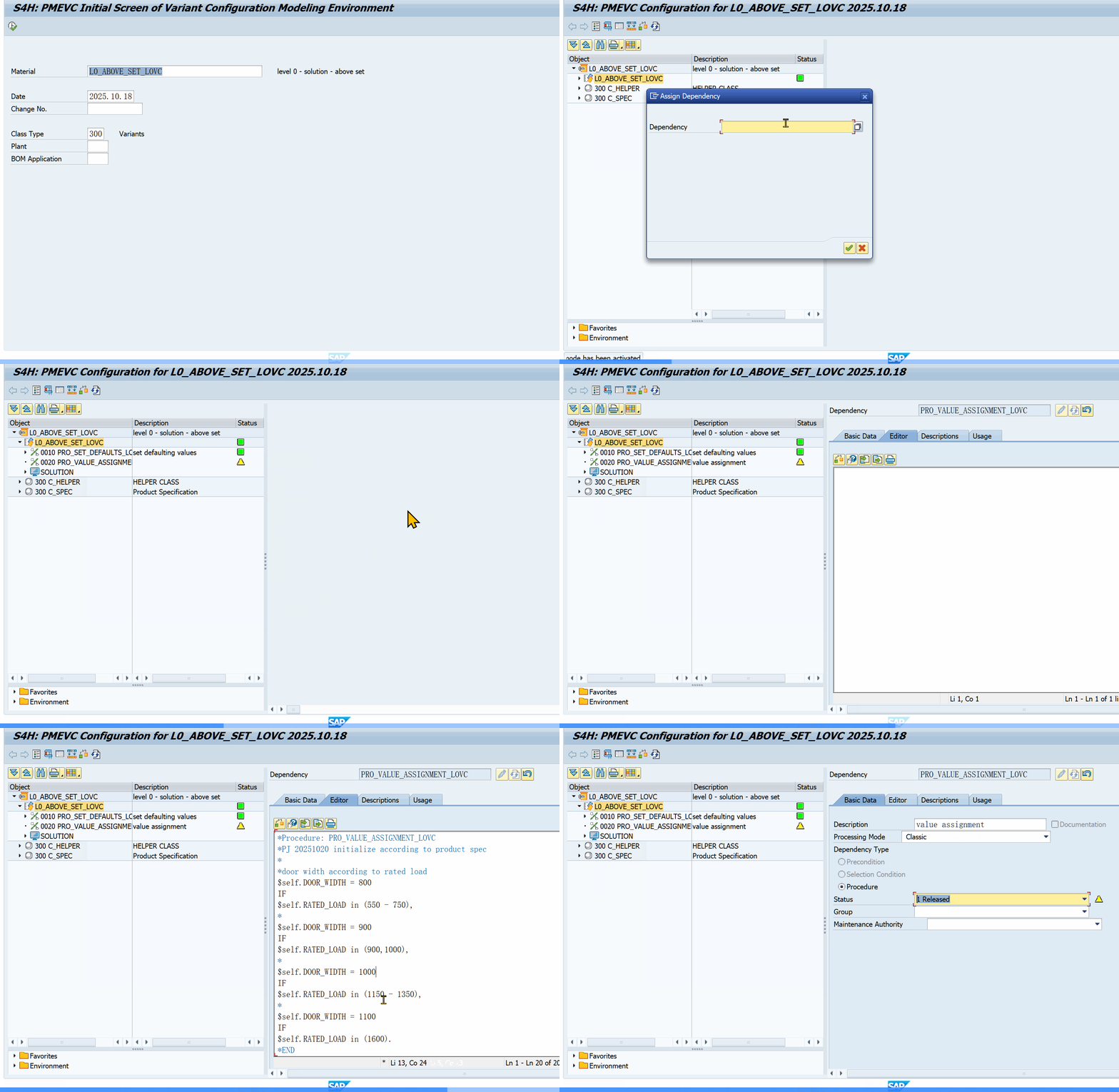 PMEVC: assigning dependencies to the configuration profile
Syntax Reference
Operators:
| Operator | Meaning |
|---|---|
| = | Equal |
| <> | Not equal |
| >, >=, <, <= | Comparison (numeric characteristics only) |
| in () | Set membership: $self.COLOR in ('Red', 'Blue') |
| AND / and | Logical AND |
| OR / or | Logical OR |
| NOT / not | Logical NOT |
| specified | Check if a characteristic has a value: $self.COLOR specified |
Numbers: Use without quotes. Strings: Use single quotes: 'Red'
Procedure assignment operators:
| Operator | Meaning |
|---|---|
| = | Force value (user cannot change) |
| ?= | Default value (user can override) |
| ?= if not (specified) | Set default only if user hasn't entered a value |
Keyword case: Characteristics and keywords are case-insensitive.
Best Practices from Real Projects
Use Constraints Instead of Preconditions
Preconditions are attached to individual characteristic values. Finding all of them means checking every value of every characteristic. Constraints live in one place (the config profile dependency net). Easier to find, debug, and audit.
Assign Procedures to the Configuration Profile
Procedures on the config profile run in a defined order. Procedures scattered across characteristics lose this ordering guarantee. Use the profile procedure list for all production logic.
Always Comment Your Code
Object dependency logic looks simple when you write it. Six months later it is cryptic. Add a comment for every non-obvious condition.
($self.COLOR = 'Red') if $self.TYPE = 'Premium'
/* Premium models force red as standard color */
Avoid Local Dependencies
Local dependencies use system-assigned sequential numbers (0001, 0002...). You cannot tell what they do from the number. You cannot reuse them. Every production dependency should be a named global dependency.
Use Parentheses for Group Conditions
($SELF.COLOR = 'Red', $SELF.SIZE = 'Medium') IF $SELF.TYPE = 'Standard'
Parentheses make the intent clear and prevent operator precedence surprises.
Understand Procedure vs. Constraint Performance
Procedures load faster but execute on every value change. Constraints have more overhead but only run when needed (when all objects in the OBJECTS section exist). For simple single-object logic use procedures. For cross-object validation use constraints.
SAP_PRICING Dependency Group
Assign pricing-only logic to the SAP_PRICING dependency group. This prevents recalculating pricing formulas during every configuration step, improving UI responsiveness.
Common Mistakes
- Using Actions: SAP marked them obsolete.
- Too many preconditions: Makes models hard to debug. Use constraints instead.
- No comments: Six months later you will not remember why you wrote
$self.X = '3' if $self.Y in ('A', 'B'). - Mixing force and default: Understand the difference between
=and?=. Using=when you meant?=blocks user choice. - Wrong object variable:
$PARENTon a header material dependency has no effect.$ROOTon a BOM item dependency might not be what you intend in deep multi-level BOMs. - Forgetting that Procedures run once: If Procedure A sets a value that Procedure B needs, and B runs before A, B gets the old value. Order your profile procedure list carefully.
Dependencies are where the complexity of Variant Configuration lives. The individual types are simple. The challenge is knowing which type to use, where to assign it, and how the processing sequence affects the result. Get those three right, and the syntax takes care of itself.
Comments & Danmaku
Leave a comment — it flies across the page as danmaku!